
Sber launches GigaPlatform AI Studio platform to test AI hypotheses and create agents without programming
In one service, you can test different models of GigaChat, configure work with voice and documents and assemble a working prototype of an AI agent.
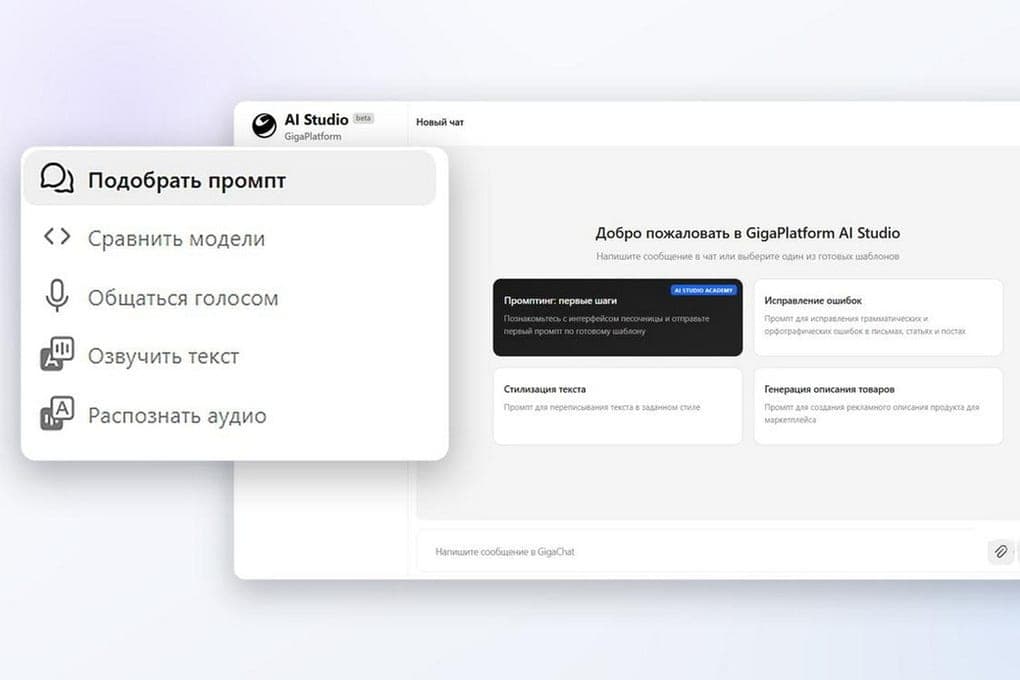
Sber introduced GigaPlatform AI Studio – a free service for those who want to try AI on their tasks and assemble their own agent without programming. The studio is created for private users and is suitable for both personal affairs and work. It can decipher the recording of the lecture, voice the text or understand a complex topic. You can also test the idea for a work project or assemble an assistant who answers the downloaded documents. One interface contains GigaChat models, tools for their configuration, work with voice and documents and a visual designer of agents from ready-made blocks. The journey from an idea to a working prototype takes hours instead of weeks of development.
All current versions of Sber’s AI models are available in AI Studio, including the flagship GigaChat 3.5 Reasoning. In the future, developers will be able to get their own access key to GigaChat text models right in the studio and try them out for free in their projects through the API.
Testing the AI hypothesis usually takes weeks and requires the involvement of programmers: for each technology, you need to write code, and there is usually no preview of the future solution. Because of this, the path from the idea to the first version stretches for months, and the tools have to be tested in different environments. GigaPlatform AI Studio addresses these challenges. For example, it is possible to test the viability of a working idea – now it will take one day instead of weeks or months. A visual designer of AI agents is suitable for those who are just familiar with the technology and do not yet know how to formulate a task in a chat so that the agent performs it correctly. The service is available for free, the entrance is by Sberbank ID.
Anton Frolov, Senior Vice President, Head of the generative AI Development Unit of Sberbank:
“The person who faces it every day knows his task best: a student before a session, a manager who drowns in the mail, a podcast writer who needs a second voice.” Previously, to entrust such a task to AI, you had to be able to program or engage a professional. In GigaPlatform AI Studio, a person can try different models, assemble his assistant from ready-made blocks and immediately check it in the case. We want the journey from an idea to a working solution to take one evening, and AI becomes as familiar a tool as a text editor or tables.
GigaPlatform AI Studio features
GigaPlatform AI Studio has GigaChat family models and tools to configure them: you can simultaneously send one request to different versions of the model and compare answers, set system instructions, change generation parameters and check the result in a chat. You can connect your documents or your own knowledge base to the model – then it will respond based on these materials, for example, as an HR consultant, first line technical support or sales assistant.
For complex research tasks, there is a Deep Research mode – it studies open sources, compares data and collects a structured report with links. You can specify or exclude certain sources, upload your own files and save the result to PDF, HTML or Markdown. The dialogue with the model and its settings can be uploaded in JSON format – shared with colleagues or used as a context for other AI services.
A separate direction is work with voice: models recognize speech and voice text with setting pauses, accents and intonation, and special markup allows you to create dialogues with different voices, for example, in the podcast format. The agent can be assembled without code and run directly in the studio. To do this, in a visual designer, it is enough to connect blocks: model, knowledge base, voice settings and dialogue scenarios, and then immediately test and run. In the studio, you can create agents for working with data and tables, image generation, checking mail, speech synthesis and other tasks. Novice users can take one of the ready-made templates or assemble from blocks or with the help of an AI assistant.
AI Studio has a built-in assistant: it explains what is happening on the screen and analyzes downloaded files. To parse the document, it is enough to download it and click “Analyze” – the assistant will prepare a brief summary and answer questions. Another studio tool is a free computer app that helps with meetings. It recognizes the beginning of the call, offers to record the conversation, decrypts it and summarizes it, and sends nothing to the cloud.
What problems can be solved in GigaPlatform AI Studio
● Work with different models without technical training: ask questions on interesting topics, visualize code, voice texts and decrypt audio.
● Remove your work routine without involving developers: for example, create an HR consultant, a first line of technical support or a sales assistant based on your knowledge base.
● Quickly test the hypothesis before writing the code: assemble a working prototype, test the prompts and parameters before integration.
● Get acquainted with Sber’s technologies: compare the answers of different versions of GigaChat, try voice models and assemble the first agent from a ready-made template.
Advertising. PJSC Sberbank. TIN 7707083893. General license of the Bank of Russia for banking operations No. 1481 dated 11.08.2015.
GigaChat 18 +